Antivirus Online Scan

  • Subscribe to our RSS feed.
  • Twitter
  • StumbleUpon
  • Reddit
  • Facebook
  • Digg

Friday, 5 July 2013

Trick to Add Image In Facebook Comment !!! / Facebook Tricks 2013

Posted on 02:37 by Unknown
Hello Friends,

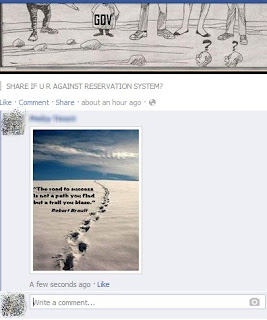
Are you  thinking to comment something different on your friends post  then just check out this post , i just found while writing a comment in one of my friend's post a small icon on the right hand side of the comment box, when i checked out it was one of the latest update that Facebook as done recently where users are allowed to add/comment images in the post, it sounds interesting . 

Just follow few steps as show below :

*Click on the icon that is show on the comment box(which looks like an camera) as show below.

*Choose the photo you want to add in comment from your desktop and press enter.


*You are done .... check out your comment which look like this  as below.
Read More
Posted in FACEBOOK TRICKS/TIPS | No comments

Top New Facebook Chat Emoticons and Stickers/ How to use Facebook Stickers

Posted on 01:41 by Unknown
Friends, 

We all love to chat on Facebook and use many chat emoticons codes to express the different emotions !!! but now you don't need to remember all those codes or copy paste those  codes . Facebook as now introduced chat stickers of different types which are cool and bit funky, i love to use them on chat and you'll also love to use You just need to add them first in your list from the Stickers stores  just by simple steps as show below.

*Click on the icon shown on the corner of the chat box
* Now you'll see the pop up as show below ,then select free  from which ever stickers you want to use .


*After selecting  it'll be added to your chat box and then you can use them on chat .


*Note: When you select more than 3 to 4 forms or types of stickers at a same time and use them on chat you may get a alert that you may be get blocked for using it  in not right way but Don't worry it gets OK after some time and works normally.
Read More
Posted in emoticons, Facebook Status message, Facebook timeline cover photo | No comments

Wednesday, 3 July 2013

Google error codes/Top New Google tricks

Posted on 23:44 by Unknown
google error codes
Friends,

Most of us come across the internet errors, during browsing and trying to open the web pages and then  we are directed to the other page showing it has Google error page with some error codes, so here in this post I've just tried to explain you what that codes actually means and  where the problem is exactly.


Error 400 - Bad request.
Error 401 - unauthorized
request.
Error 403 - forbidden.
Error 404 - Not found.
Error 500 -Internal error.
Error 501 - Not Implemented
Error 502 - Bad Gateway
Error 503 -Service unavailable.
Error 504 - Gateway Time-Out
Error 505 - HTTP Version not supported/DNS Lookup Fail/unknown host
Error 500-599 - Server Errors.

Now i guess next time when you are getting this errors you'll get to know what's wrong while the web page you are searching for.
Read More
Posted in GOOGLE TRICKS | No comments

Essential Methods To Market Your Blog

Posted on 22:06 by Unknown

Without effective marketing strategies of a blog decent traffic can’t be achieved. Many popular websites pay lots of money for making their blog’s marketing strong. But these days you are completely enclosed by many blogs so for making your marketing strategies effective you have to pay attention to some important points so that you can stand in this crowd. In this post I am mentioning some important free as well as paid methods to get traffic to your blog. 


  • Social sharing: - As we know that for social media’s reputation is very important and also it is one of most cheapest and easiest method for social media marketing. If you are engaged in huge social media network and are having huge number of followers then it is beneficial to share content of your blog at very low rate. (Here cost does not refer to money). Here only hard work is to build a strong social network and do the good marketing of your blog. These days Pinterest, Facebook, Twitter and Google plus are most popular social marketing websites. They have millions of user active all day. So here a blog can be advertised free of cost. 
  • Social bookmarking: - We are having huge count of social bookmarking websites on internet. These websites have large number of active users. Rating of social bookmarking websites varies and there are some of them which can drive huge traffic to your blog. 
  • Groups/ Facebook page: - Using groups and Facebook page is a traditional method of blog promotion. If you are having fan page of your blog then blog post’s influence can be easily created. This fan page must have the name of your blog so that your social presence can be easily boosted up. On Facebook there are many active groups which can help in sharing of your blog’s link. With the help of this link sharing service you can easily drive huge traffic to your blog. Your social presence can remain maintained if you will remain active at your page.
  • Google Ad words: - You can achieve direct traffic with the help of Google Ad words but for doing this you have to spend few bucks on advertisement. Your bidding on PPC network will decide that your advertisement will appear in search result or not. So if your bid is lower than your add will appear in search results of the websites that are using Ad sense network.
  • Stumble upon Ads: - This is one of the most popular social bookmarking website which provides the site of your own interest. For accessing this facility you have to make a Stumble Upon account and then choose some category on it. It is based on browser’s technology with a button on its top corner. With the help of this button helps you to surf most wonderful website of your interest on Stumble Upon. Ad campaign facility is also available on this website at $0.05 per page. These ads are called Stumble upon ads. 
  • Sponsored Reviews: - Reviews from sponsors can be purchased for your blog and for making it better you have to spend some money. This will help in attracting huge amount of back links and traffic to your blog. Paid reviews can be enjoyed at as low $5 per review. 
  • Ad Banners: - Many famous websites provides offers the facility of direct adds banners. Instead of page views their rates are based on weekly and monthly basis. So banner advertisement of your site can be created and can be exposed by these websites.
  • Mailing list: - If you want to have huge count of readers for your blog then you must build a mailing list. If you are able to easily build and manage your blog’s mailing list then you can directly send fresh posts of your blog to your subscribers. With the help of mailing list you can easily market your brand. Useful tools for mailing list can be easily provided by many marketing services like Aweber and Mail Chimps. 
  • Write about shares and shits: - If you are unable to decide which topic to write then you can choose some random topic and can market then with links of some of your old blogs. A group of powerful people can be targeted for this purpose. You can also insert your experience and can share it with your subscribers. Sometimes you must write about some high ranking blogs or Epic topics. By doing this you will surely get some traffic. 
Read More
Posted in Blogger tricks, Latest | No comments

Tuesday, 2 July 2013

Microsoft Keyboard Shortcuts/Hotkeys

Posted on 22:51 by Unknown

Sharing some shortcut keys , which is quit useful while working on the Microsoft platform.
1. Windows Logo (Display or hide the Start menu)
2. Windows Logo+BREAK (Display the System Properties dialog box)
3. Windows Logo+D (Display the desktop)
4. Windows Logo+M (Minimize all of the windows)
5. Windows Logo+SHIFT+M (Restore the minimized windows)
6. Windows Logo+E (Open My Computer)
7. Windows Logo+F (Search for a file or a folder)
8. CTRL+Windows Logo+F (Search for computers)
9. Windows Logo+F1 (Display Windows Help)
10. Windows Logo+ L (Lock the keyboard)
11. Windows Logo+R (Open the Run dialog box)
12. Windows Logo+U (Open Utility Manager)
13. Accessibility Keyboard Shortcuts
14. Right SHIFT for eight seconds (Switch Filter Keys either on or off)
15. Left ALT+left SHIFT+PRINT SCREEN (Switch High Contrast either on or off)
16. Left ALT+left SHIFT+NUM LOCK (Switch the Mouse Keys either on or off)
17. SHIFT five times (Switch the Sticky Keys either on or off)
18. NUM LOCK for five seconds (Switch the Toggle Keys either on or off)
19. Windows Logo +U (Open Utility Manager)
20. Windows Explorer Keyboard Shortcuts
21. END (Display the bottom of the active window)
22. HOME (Display the top of the active window)
23. NUM LOCK+Asterisk sign (*) (Display all of the sub folders that are under the selected folder)
24. NUM LOCK+Plus sign (+) (Display the contents of the selected folder)
25. NUM LOCK+Minus sign (-) (Collapse the selected folder)
26. LEFT ARROW (Collapse the current selection if it is expanded, or select the parent folder)
27. RIGHT ARROW (Display the current selection if it is collapsed, or select the first sub folder)
Read More
Posted in Hotkeys, PC TRICKS | No comments

Remove/Turn off Google Web History/New Google trick

Posted on 21:38 by Unknown
Hello friends,

  Today I'm sharing a trick which will allow you to delete or clear all your search and  clicks on Google  account i.e all the saved history of your search on Google and others work will be deleted . In simple words just like clearing your web history in browser but here its on Google account.

Just follow few simple steps  as shown below:

1. Log in  to your Google Account by using your Gmail id and Password.

2. Now , Click Here for accessing your Google Web History.

 3. Go to right side of page click on "Setting"


4. Now click on Turn Off and now your search query is no longer be saved.


5. If you want to delete your web history then click on "Remove Items",all the data will be removed completely. You can select here that how much you need to clear based on days.


*Note:If you want to re-enable your web history then simply go back on setting and click on turn back again.
Read More
Posted in GMAIL TRICKS N TIPS, GOOGLE TRICKS | No comments

Monday, 1 July 2013

Review : Micromax Canvas Lite A92 Priced in India at Rs 8,499.

Posted on 00:17 by Unknown
Micromax Canvas Lite A92  is been launched today with a great design and  with awesome features.It has been priced in Indian market at Rs 8,499* at online stores.

Some of the features are tagged below

It comes with 5-inch TFT capacitive touch screen display with a resolution of 480X854 pixels and a pixel density of 196 ppi. It is powered by a 1GHz dual-core processor alongside 512MB of RAM and runs on Android v. 4.1 Jelly Bean OS.

It has 4GB of internal storage, of which 0.94 GB is user accessible. The storage can be further expanded by up to 32GB via microSD card. It is a dual-SIM (GSM+GSM) smartphone with dual standby. Other connectivity options include 3G, Wi-Fi 802.11 b/g/n, Bluetooth and GPRS.

 5 megapixel camera with 5x digital zoom and a LED flash. The phone also features of taking snaps in the night mode and multi shot mode.The camera is also capable of recording videos at 30 fps. There is no front camera on this smartphone.

Measuring 77x147x10.8 mm Micromax A92 Canvas Lite packs in a 2,000mAh battery which, as per the company's claims, gives 6 hours of talk time and 240 hours of standby time on 2G network.

Read More
Posted in Gadgets, Micromax Canvas, Reviews | No comments
Newer Posts Older Posts Home
Subscribe to: Posts (Atom)

Popular Posts

  • Review Samsung Galaxy S4/Price of Samsung Galaxy S4 in India
    Hello friends, Samsung as finally  launched the  device we all were waiting for  Galaxy s4 at an event in NYK.Samsung device is packed with ...
  • Top 10+ sites to send Free message in India./Send free message to mobile
    Hello friends, S ending SMS in India to mobile phone using internet was never so easy  But now you can send free SMS in any part of India by...
  • Christmas Facebook Timeline Cover
    Hello friends, Today I'm going to share some of best Facebook timeline cover for Christmas, you have to just click on the image and save...
  • Facebook Profile Photo for Girls.
    Hello friends, Here is some awesome, cute and lovely profile photos for girls , which you can use for  Facebook or other social network . ...
  • Nokia Lumia 925 launched in London/Review on Nokia Lumia 925 and Price.
    Nokia has just launched its Lumia 925 smartphone at an event in London. In terms of specs however, it seems a lot like the Lumia 920 and the...
  • Collection Of Top Free Online Hindi English Dictionaries
    Dictionaries are the best part of my life because it helps me to find some difficult's words evrytime when i write my blog post. But the...
  • FUNNY FACEBOOK STATUS
     Hello Friends, Here is some funny Facebook status message for you all. Hate it when you open the fridge and can’t find what you were lookin...
  • Microsoft Keyboard Shortcuts/Hotkeys
    Sharing some shortcut keys , which is quit useful while working on the Microsoft platform. 1. Windows Logo (Display or hide the Start menu) ...
  • World's cheapest laptop ACi Icon 1100 /Review on ACi Icon 1100
    Hello friends, World's cheapest laptop is been finally released by ACi(Allied Computers International (Asia) Ltd.). The ACi Icon 1100 ...
  • Trick to Safeguard Your Email Address/Gmail tricks
    We find it a safe measure to share our personal information and images through emails  which is the common thing that most of the time we ...

Categories

  • ADD/DELETE/EDIT APPLICATIONS ON PC
  • ADOBE TRICKS
  • advanced removal
  • Android
  • Android Games.
  • Android tricks
  • Antivirus
  • antivirus software
  • apps
  • auto insurance
  • Awareness.
  • Backlinks
  • best car insurance companies
  • best free antivirus
  • block porn
  • Blogger tricks
  • Burning softwares
  • car
  • Car donation
  • cars
  • CD-DVD Burning Softwares
  • Chat opt.
  • Christmas special.
  • comcast removal
  • Commentluv
  • Directories
  • DoFollow
  • Donate a car
  • Download
  • Earn Money
  • Ebooks
  • emoticons
  • facebook
  • Facebook Status message
  • Facebook Status message .
  • Facebook timeline cover photo
  • FACEBOOK TRICKS/TIPS
  • free antivirus
  • Free apps
  • Free books
  • Free Car Insurance
  • FREE MOBILE RECHARGE TRICKS
  • free protection
  • Full forms
  • FULL FORMS.Grab knowledge
  • Funny
  • Gadgets
  • GMAIL TRICKS N TIPS
  • Google + cover photo
  • Google Adsense
  • Google doodle
  • Google Drive
  • Google Search Timer
  • GOOGLE TRICKS
  • Grab knowledge
  • Greetings
  • Hacking Guide
  • Happy Birthday
  • High PR
  • Hotkeys
  • how to donate a car
  • independence day
  • Inventions
  • IP ADDRESS
  • iphone
  • kaspersky virus removal tool 2011
  • l
  • Latest
  • Latest tricks
  • Live wallpapers
  • Malwares
  • MEDIA PLAYERS /TRICKS
  • Micromax Canvas
  • Microsoft
  • Mobile tricks
  • New Year Special
  • Nokia
  • norton removal tool
  • NOTEPAD TRICKS
  • Online
  • Online Scanner
  • Online Car Insurance
  • Online Dictiornaries
  • Online Scan
  • ONLINE TRICKS N TIPS
  • PC TRICKS
  • Pen drive
  • Photo Editing Tools
  • PRODUCT KEY FOR GAMES
  • PRODUCT KEYS
  • Programming
  • protection
  • Quotes
  • Reviews
  • rootkit removal
  • RSS Blog Directories
  • safe removal
  • Samsung
  • Samsung Galaxy
  • SEO
  • Smartphones
  • Smartwatches
  • social bookmarking
  • social network
  • Soft wares
  • Softwares
  • Solutions for for
  • Solutions for you
  • Sony
  • Tablet
  • Tech News
  • Themes
  • timeline covers
  • tips
  • Tools
  • Top
  • Top 10
  • Top Ten Online Scan.
  • top ten virus removal tool
  • truecaller
  • Twitter
  • Valentin Day special
  • viral removal
  • viral removal tool
  • Web Browser
  • window 8
  • WINDOWS 7
  • WINDOWS 8
  • WINDOWS XP
  • winrar
  • Yahoo Messenger

Blog Archive

  • ▼  2013 (232)
    • ▼  November (4)
      • Hotkeys/Shortcut keys of Microsoft Access.
      • Shortcut Keys of MS Excel/ Microsoft Office tricks.
      • Best trick to take Screenshot on your Android Device
      • Trick to Create, Rename and Remove Folders in And...
    • ►  October (15)
    • ►  September (14)
    • ►  August (39)
    • ►  July (37)
    • ►  June (11)
    • ►  May (39)
    • ►  April (29)
    • ►  March (13)
    • ►  February (11)
    • ►  January (20)
  • ►  2012 (167)
    • ►  December (34)
    • ►  October (4)
    • ►  September (1)
    • ►  August (5)
    • ►  July (11)
    • ►  June (40)
    • ►  May (22)
    • ►  April (9)
    • ►  March (16)
    • ►  February (8)
    • ►  January (17)
  • ►  2011 (8)
    • ►  December (8)
Powered by Blogger.

About Me

Unknown
View my complete profile