Antivirus Online Scan

  • Subscribe to our RSS feed.
  • Twitter
  • StumbleUpon
  • Reddit
  • Facebook
  • Digg

Friday, 30 March 2012

Disable Adds on Facebook.

Posted on 03:05 by Unknown
Hello friends!

Today I'm going to share with you all a trick to  disable  or remove adds from your Facebook  account;
Just by installing an simple plug in to your Firefox web browser  know as
Greasemonkey .once you finish installing it , just follow one of the  method and install one of the scripts

Remove All Facebook Ads – Removes banner ads, sponsored items in news feed and sponsored sidebar items from Facebook.

NoFacebookAds – Removes Facebook flyer and network adverts, including ’social adverts’ such as the annoying Danish barber adverts.

Hide Facebook Ads – Hide “Facebook Flyer” adverts on Facebook left sidebar on homepage or profile page.

Facebook – Hide FeedAds – Hides the ads inserted into Facebook Feed. (WARNING: May be a phishing script. Use with own care.)

Cipher’s Facebook Remove Ads or Facebook Companion – Both remove ads from Facebook, where the later is the original source code.

NoPirateQuestAds – Specific to PirateQuest ads, where it prevents any Facebook wall entries containing ads for “PirateQuest” from appearing.
Read More
Posted in FACEBOOK TRICKS/TIPS | No comments

Tool to secure your google account

Posted on 02:29 by Unknown
Google as introduced a new tool which will help  Google users to have a track of their activity .
its also helpful in keeping an eye at hackers! where you'll get to know  about the  activity list where you  can check out the location and sessions from where you have sign in and out.Where you  can opt to receive the reports by e-mail. When you choose to receive the reports you will receive a link directing you to sign in to their accounts for a summary of their online activity.

The report consist of  information such as how many e-mails you’ve sent and received in the past month, Web history  where they surf the Web, what browser they use, and information on accounts associated with your e-mail address.

This tool helps in maintaining account more safe as this allow you to have more insight into your account use and also give you the opportunity to find if someone else is using your account as i mentioned above account.

For example, if you notice sign-in from other places or countries where you haven’t been or devices you’ve never owned, you can change your password immediately and protect your account
Read More
Posted in GOOGLE TRICKS | No comments

Wednesday, 28 March 2012

how to hide your comment and like in facebook.

Posted on 08:09 by Unknown
Hello friends,
 Today I'm going to share with you a trick to hide your recent activities like comments,likes and friends that you add in the Facebook from appearing in news feed.

Just follow the simple steps:-

1.check out  your recent activity list in profile page where you'll find your list of activities like comments ,likes and the friend you added recently in it.


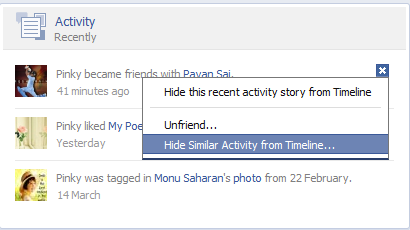
2. just select the comment's or likes activity and click at remove option, the pop up appears as shown  below


3. Select the  option Hide All Recent Pages From The Timeline and select the Hide all option in the next pop up that appears.


4. To hide the recently added friend activity ,just select the option  Hide Similar Activity From Timeline and again  select the option Hide All in the pop up that appears on screen.


Now you are done with your settings!  After all this steps your recent activities will be hidden and would not be seen on your friends wall.

5.If you want to deactivate all these settings that you made recently  ,you just need to select the option that is show right side of the Activity Recently and select Hidden Activity.
After this step the list of hidden story types appears where you need to remove the activity that you want  to undo.As shown in the image-


 *leave your feed back  if you find it useful*

Read More
Posted in FACEBOOK TRICKS/TIPS | No comments

Sunday, 25 March 2012

Trick to Disable Windows Vista and 7 Login at Startup

Posted on 01:12 by Unknown
Disabling Windows Vista and 7 Login at Start up

When you start your Windows Vista or Windows 7 computer, by default the system makes you enter your password to log in. Here’s a way to get around it.

When you first install Vista or 7 and start using it,you are required to enter in a password for your account. But after that, you’re not really given a choice to remove the password if you don’t wantit. You’re just sort of stuck typing it in every time and that can get old rather quickly!

If you’re not the only one who uses your computer, consider leaving it this way. It is a good security feature and it helps to keep all of the different accounts, files and preferences separate from each other.
But if you’re the only one who ever uses your computer, you should be able to get rid of the password prompt if you want.

If you’d like to bypass the Windows Vista and 7 log on process and remove your password, just follow these steps:

1. Go to Start, Control Panel.

2. Click on the User Accounts and Family Safety link.

3. Next, click on the User Accounts link.

4. Under the “Make changes to your user account” section, click on the Remove Your Password link for your account.

5. On the next screen that comes up, enter in your current password.

6. Click on the Remove Password button to confirm everything.

7. Close out of all the open windows and restart your computer. That will allow you to test the system to make sure your password really was removed.

From now on, when you start up your Vista computer, you will be taken to your desktop automatically and you will no longer have to worry about a password.
Read More
Posted in WINDOWS 7 | No comments

Saturday, 24 March 2012

Posted on 23:54 by Unknown
Windows 7 hot keys/shortcuts From Desktop

Windows Key + Tab : Aero
[press Tab to cycle between
Windows]

Windows Key + E : Windows Explorer is launched.

Windows Key + R : Run
Command is launched.

Windows Key + F : Search
(which is there in previous Windows versions too)

Windows Key + X : Mobility Center

Windows Key + L : Lock Computer

Windows Key + U : Launches Ease of Access

Windows Key + P : Projector

Windows Key + T : Cycle Super Taskbar Items

Windows Key + S : OneNote Screen Clipping Tool
[requires OneNote]

Windows Key + M : Minimize All Windows

Windows Key + D : Show/Hide Desktop

Windows Key + Up :
Maximize Current Window

Windows Key + Down :Restore Down/Minimize
Current Windows

Windows Key + Left : Tile Current Window to the Left

Windows Key + Right : Tile Current Windows to the Right
[Continue pressing the Left and Right keys to rotate the window as well]

Windows Key + # (# is any number) : Quickly Launch a
new instance of the application in the Nth slot on the taskbar. Example Win+1
launches first pinned app, Win+2 launches second, etc.

Windows Key + = : Launches the Magnifier

Windows Key + Plus : Zoom in

Windows Key + Minus : Zooms out

Windows Key + Space : Peek at the desktop From Windows Explorer

Alt + Up : Go up one level

Alt + Left/ Right : Back/Forward

Alt + P : Show/hide Preview Pane
Task Modifiers

Shift + Click on icon :
Open a new instance

Middle click on icon :
Open a new instance

Ctrl + Shift + Click on icon : Open a new instance with Admin privileges

Shift + Right-click on icon : Show window menu (Restore / Minimize / Move /
etc). Note: Normally you can just right-click on the window thumbnail to get this menu.

Shift + Right-click on

grouped icon : Menu with Restore All / Minimize All /
Close All, etc.

Ctrl + Click on grouped icon : Cycle between the windows (or tabs) in the group.
Read More
Posted in WINDOWS 7 | No comments

Thursday, 22 March 2012

TRICK TO SPEED UP ACROBAT READER !!!

Posted on 19:49 by Unknown
Hello friends , 

we often find problem while opening the files in Adobe Acrobat reader as it always consumes more memory when it starts.
The reason behind is, it loads all the plugins, even the plugins that you do not use.
This trick is to remove all the plugins from the plugins directory to elsewhere.
Hence, whenever you open Acrobat reader it directly opens the files without loading any plugins and the speed is just like Notepad.

1. Go to the installation folder of acrobat reader

(C:\program files\adobe\acrobat\reader\.. whatever)

2. Move all the files and folders from the"plugins" directory to the "Optional" directory. ( cut and paste the files NOT copy & paste). 

*NOTE:Also make sure that acrobat reader is not open else it will lock the files and not allow you to move the files).

Now your acrobat reader will load very fast and almost as good as notepad.
Read More
Posted in ADOBE TRICKS | No comments

Monday, 19 March 2012

product key for Nero 11.0.15

Posted on 00:36 by Unknown
9004-027E-UM18-71C6-57TK-P034-UU8X-0U4A
Read More
Posted in PRODUCT KEYS | No comments
Newer Posts Older Posts Home
Subscribe to: Posts (Atom)

Popular Posts

  • Review Samsung Galaxy S4/Price of Samsung Galaxy S4 in India
    Hello friends, Samsung as finally  launched the  device we all were waiting for  Galaxy s4 at an event in NYK.Samsung device is packed with ...
  • Top 10+ sites to send Free message in India./Send free message to mobile
    Hello friends, S ending SMS in India to mobile phone using internet was never so easy  But now you can send free SMS in any part of India by...
  • Christmas Facebook Timeline Cover
    Hello friends, Today I'm going to share some of best Facebook timeline cover for Christmas, you have to just click on the image and save...
  • Facebook Profile Photo for Girls.
    Hello friends, Here is some awesome, cute and lovely profile photos for girls , which you can use for  Facebook or other social network . ...
  • Nokia Lumia 925 launched in London/Review on Nokia Lumia 925 and Price.
    Nokia has just launched its Lumia 925 smartphone at an event in London. In terms of specs however, it seems a lot like the Lumia 920 and the...
  • Collection Of Top Free Online Hindi English Dictionaries
    Dictionaries are the best part of my life because it helps me to find some difficult's words evrytime when i write my blog post. But the...
  • FUNNY FACEBOOK STATUS
     Hello Friends, Here is some funny Facebook status message for you all. Hate it when you open the fridge and can’t find what you were lookin...
  • Microsoft Keyboard Shortcuts/Hotkeys
    Sharing some shortcut keys , which is quit useful while working on the Microsoft platform. 1. Windows Logo (Display or hide the Start menu) ...
  • World's cheapest laptop ACi Icon 1100 /Review on ACi Icon 1100
    Hello friends, World's cheapest laptop is been finally released by ACi(Allied Computers International (Asia) Ltd.). The ACi Icon 1100 ...
  • Trick to Safeguard Your Email Address/Gmail tricks
    We find it a safe measure to share our personal information and images through emails  which is the common thing that most of the time we ...

Categories

  • ADD/DELETE/EDIT APPLICATIONS ON PC
  • ADOBE TRICKS
  • advanced removal
  • Android
  • Android Games.
  • Android tricks
  • Antivirus
  • antivirus software
  • apps
  • auto insurance
  • Awareness.
  • Backlinks
  • best car insurance companies
  • best free antivirus
  • block porn
  • Blogger tricks
  • Burning softwares
  • car
  • Car donation
  • cars
  • CD-DVD Burning Softwares
  • Chat opt.
  • Christmas special.
  • comcast removal
  • Commentluv
  • Directories
  • DoFollow
  • Donate a car
  • Download
  • Earn Money
  • Ebooks
  • emoticons
  • facebook
  • Facebook Status message
  • Facebook Status message .
  • Facebook timeline cover photo
  • FACEBOOK TRICKS/TIPS
  • free antivirus
  • Free apps
  • Free books
  • Free Car Insurance
  • FREE MOBILE RECHARGE TRICKS
  • free protection
  • Full forms
  • FULL FORMS.Grab knowledge
  • Funny
  • Gadgets
  • GMAIL TRICKS N TIPS
  • Google + cover photo
  • Google Adsense
  • Google doodle
  • Google Drive
  • Google Search Timer
  • GOOGLE TRICKS
  • Grab knowledge
  • Greetings
  • Hacking Guide
  • Happy Birthday
  • High PR
  • Hotkeys
  • how to donate a car
  • independence day
  • Inventions
  • IP ADDRESS
  • iphone
  • kaspersky virus removal tool 2011
  • l
  • Latest
  • Latest tricks
  • Live wallpapers
  • Malwares
  • MEDIA PLAYERS /TRICKS
  • Micromax Canvas
  • Microsoft
  • Mobile tricks
  • New Year Special
  • Nokia
  • norton removal tool
  • NOTEPAD TRICKS
  • Online
  • Online Scanner
  • Online Car Insurance
  • Online Dictiornaries
  • Online Scan
  • ONLINE TRICKS N TIPS
  • PC TRICKS
  • Pen drive
  • Photo Editing Tools
  • PRODUCT KEY FOR GAMES
  • PRODUCT KEYS
  • Programming
  • protection
  • Quotes
  • Reviews
  • rootkit removal
  • RSS Blog Directories
  • safe removal
  • Samsung
  • Samsung Galaxy
  • SEO
  • Smartphones
  • Smartwatches
  • social bookmarking
  • social network
  • Soft wares
  • Softwares
  • Solutions for for
  • Solutions for you
  • Sony
  • Tablet
  • Tech News
  • Themes
  • timeline covers
  • tips
  • Tools
  • Top
  • Top 10
  • Top Ten Online Scan.
  • top ten virus removal tool
  • truecaller
  • Twitter
  • Valentin Day special
  • viral removal
  • viral removal tool
  • Web Browser
  • window 8
  • WINDOWS 7
  • WINDOWS 8
  • WINDOWS XP
  • winrar
  • Yahoo Messenger

Blog Archive

  • ▼  2013 (232)
    • ▼  November (4)
      • Hotkeys/Shortcut keys of Microsoft Access.
      • Shortcut Keys of MS Excel/ Microsoft Office tricks.
      • Best trick to take Screenshot on your Android Device
      • Trick to Create, Rename and Remove Folders in And...
    • ►  October (15)
    • ►  September (14)
    • ►  August (39)
    • ►  July (37)
    • ►  June (11)
    • ►  May (39)
    • ►  April (29)
    • ►  March (13)
    • ►  February (11)
    • ►  January (20)
  • ►  2012 (167)
    • ►  December (34)
    • ►  October (4)
    • ►  September (1)
    • ►  August (5)
    • ►  July (11)
    • ►  June (40)
    • ►  May (22)
    • ►  April (9)
    • ►  March (16)
    • ►  February (8)
    • ►  January (17)
  • ►  2011 (8)
    • ►  December (8)
Powered by Blogger.

About Me

Unknown
View my complete profile